Flusia CRM · MCP Server
Connect Flusia CRM to Model Context Protocol–compatible AI assistants: Claude.ai, Claude Desktop, Claude Code, ChatGPT Connectors and the Claude mobile app.
https://api.flusia.it/mcp1.0.01. What it is
The Flusia MCP server exposes ~212 tools that let an AI assistant read and modify leads, deals, tasks, projects, invoices, newsletter campaigns, WhatsApp chats and other entities of the CRM organization tied to the API token.
The granular permission model configured by the admin is enforced: the AI can never do more via MCP than the user is already authorized to do in the CRM.
2. Features and use cases
Exposed resources (212 tools total):
| Resource | Tool prefix | Capability |
|---|---|---|
| Leads / Clients | crm_clients_* | CRUD, search, related deals, notes, recordings |
| Deals | crm_deals_* | CRUD, status, services, contacts, commissions, notes |
| Tasks | crm_tasks_* | CRUD, checklist, attachments, tags, assignment |
| Projects | crm_projects_* | CRUD, brief, activities, archive, assignments |
| Activities | crm_activities_* | Timeline of calls, meetings, emails, notes |
| Services | crm_services_* | Service/product catalog |
| Pipelines | crm_pipelines_* | Pipelines and sales stages |
| Invoices | crm_invoices_* | Read Fatture in Cloud invoices, allocation, queue |
| Newsletter | crm_newsletter_* | Lists, email campaigns, blacklist, quota, domains |
crm_whatsapp_* | Chats, messages, notes, per-user ACL | |
| QR Codes | crm_qr_codes_* | Generate and manage QR tracking |
| Wiki | crm_wiki_* | Organization knowledge base |
| Workflow | crm_workflows_* | Automation builder steps + triggers |
| Settings | crm_settings_* | Org settings (users, roles, templates) |
| Stats | crm_stats_* | KPI snapshot + revenue analytics |
Every tool declares the standard MCP annotations (readOnlyHint for reads, destructiveHint for irreversible operations) as required by the Anthropic MCP Directory Policy.
Typical use cases
- Conversational sales assistant: search leads, update status, create follow-up tasks, send WhatsApp messages.
- Automatic reporting from natural prompt ("Summary of deals won this week by pipeline X").
- Safe bulk operations: the AI proposes, the user confirms (human-in-the-loop on destructive tools).
- Customer onboarding: lead + deal + task + checklist in a single conversational turn.
- Diagnostics: the AI queries CRM state to investigate anomalies reported by operators.
3. How to connect
Claude.ai (web)
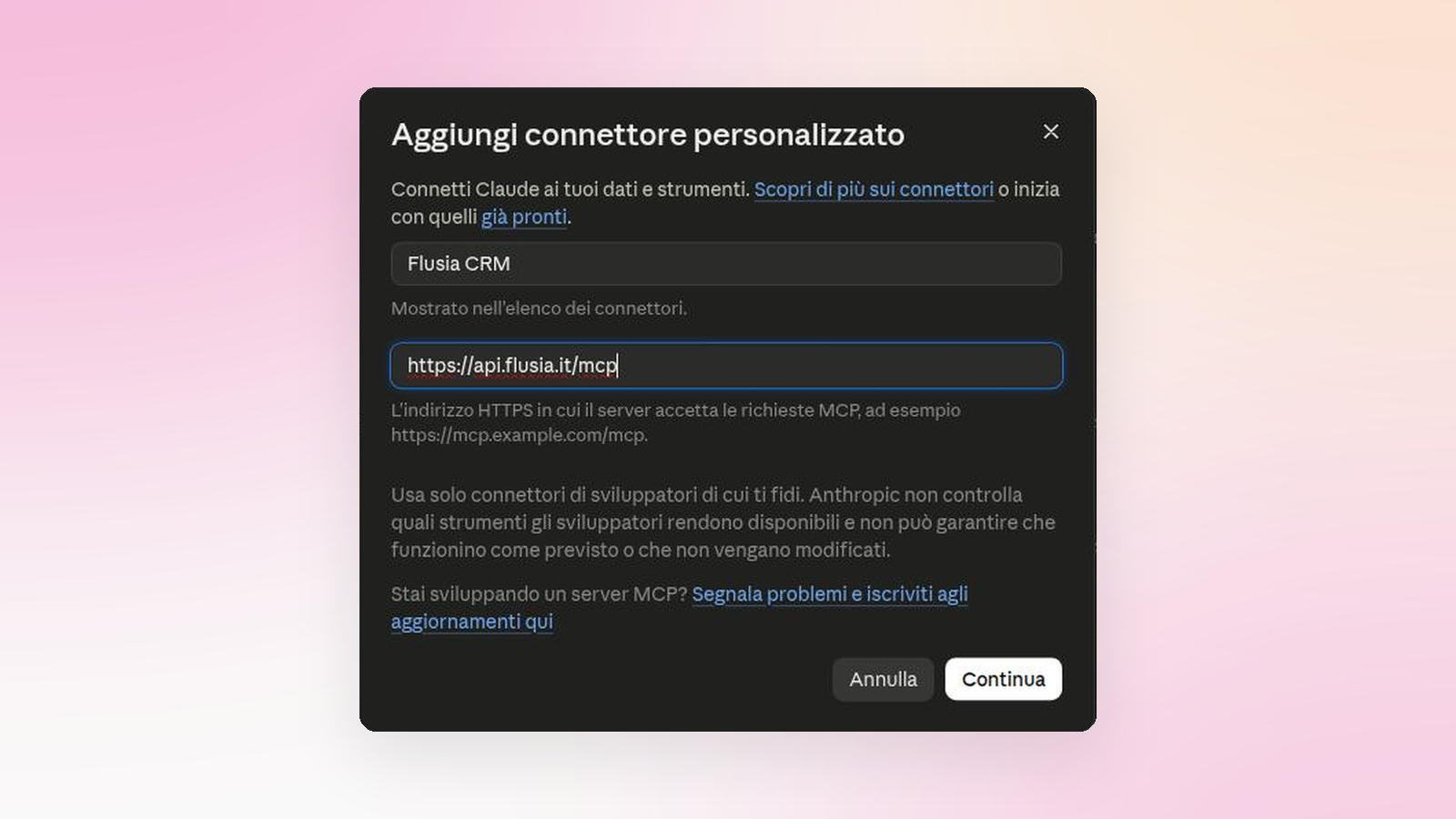
- Go to claude.ai and open Customize → Connectors → Add
- Name: "Flusia CRM"
- Server URL: https://api.flusia.it/mcp
- Confirm. On first use Claude will start the OAuth flow.
ChatGPT
The same URL can be added to ChatGPT connectors. Mind the plan: full MCP support goes through developer mode and is limited to Business and Enterprise/Edu plans on ChatGPT web (OpenAI documentation, September 2026). It is not available on personal plans.
5. Usage examples
Example 1: Create a lead from natural chat
"Create a new lead called Studio Dentistico Bianchi, VAT 12345678901, based in Milan at Via Roma 10, and assign the opportunity to Mario Rossi. Add a follow-up task to call him tomorrow."
crm_users_list (search Mario Rossi → obtains user_id)crm_clients_create_lead with business_name, vat_number, address, assigned_tocrm_tasks_create with client_id of the new lead, due_date = tomorrow
The AI confirms with the 2 created IDs and a verbal summary.
Example 2: Report of deals won last month
"Which deals did we close as won last month? Show total revenue and the top 3 by value."
crm_stats_revenue with start_date and end_date → returns total_revenue and win_ratecrm_deals_list with status: "accepted", limit: 50The AI sorts and produces a table + KPIs
Revenue closed last month: €127,430
Win rate: 34%
Top 3 deals: ACME Corp €45,000, Studio Verdi €28,500, TechStart €19,800
Example 3: Conversational cleanup with confirmation
"Delete all duplicate leads of ‘Mario Rossi’ with the same VAT number."
crm_clients_search with q: "Mario Rossi" → candidatesClient-side filter for duplicate VATThe MCP client asks explicit confirmation because crm_clients_delete has destructiveHint: trueOn confirm → loop of crm_clients_delete
The user sees the confirmation prompt for each operation, the AI shows the final summary.
Tools with destructiveHint: true (delete, remove, cancel, archive, unassign) automatically trigger the human-in-the-loop pattern in MCP clients, which ask user confirmation before execution.
6. Privacy and data protection
Data processing follows:
- Privacy Policy
- Terms and Conditions
- DPA (Data Processing Agreement) on request at privacy@flusia.it
What flows through MCP
- Only what the assistant actually asks for: ask about stalled deals and only those travel, nothing else
- Whatever the assistant receives lands in your conversation with it, so it is processed by its provider (Anthropic for Claude, OpenAI for ChatGPT) under the terms you accepted with them: they are US companies, and that holds even though your Flusia stays in Europe
- You turn the connection on and you can turn it off at any time: until you connect it, nothing leaves the CRM
- We keep a trace of each request for 30 days, without storing its content
What does NOT flow through
- The Flusia server does not receive the user-AI conversation, only the arguments of the tools the AI chooses to invoke
- The assistant provider (Anthropic or OpenAI) sees the responses inside the conversation, but has no direct access to the Flusia database
7. Support
| Technical support | supporto@flusia.it |
| Security / vulnerabilities | security@flusia.it |
| Privacy / GDPR | privacy@flusia.it |
| Status page | https://status.flusia.it |
| User documentation | /wiki |
SLA: response within 1 business day for standard support, within 4 business hours for confirmed security issues.
Ready to connect your CRM to your AI assistant?
Create a Flusia account and link the MCP connector in less than 5 minutes. No server-side configuration required.