
Native Integration

Invoices write themselves. You focus on selling.

Native Fatture in Cloud integration. From closed deal to issued invoice: zero manual steps.

Fatture in Cloud
Try it free
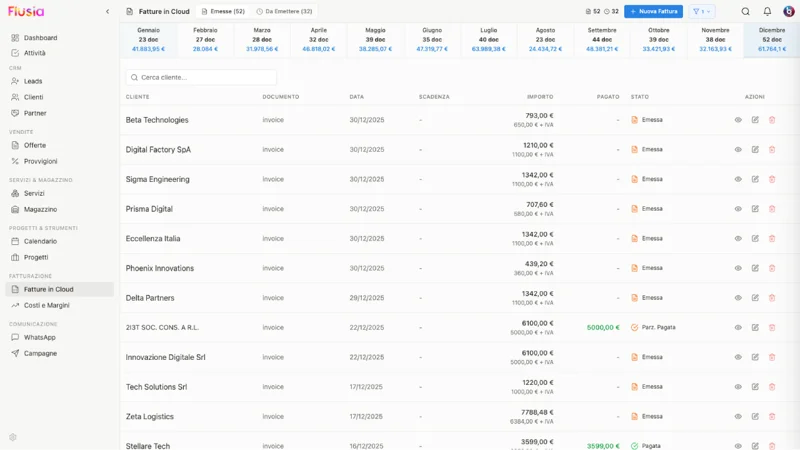
Fatture in Cloud integration screenshot

What you can do

A complete integration to automate your company's administrative management.

Customer Sync

Import and export customers between Flusia and Fatture in Cloud with one click. Keep data always aligned on both platforms.

Invoice Issuance

Create electronic invoices directly from Flusia. Automatic submission to the Italian SDI interchange system via Fatture in Cloud.

Complete Automation

Automatic invoicing queue from accepted deals. Progressive numbering managed by Fatture in Cloud.

Payment Monitoring

View invoice status, track payments and send automatic reminders for overdue invoices.

Why choose this integration

  • Eliminate double customer entry
  • Reduce data transcription errors
  • Save hours of administrative work every week
  • Keep accounting always up to date
  • GDPR compliance and Italian electronic invoicing
Fatture in Cloud integration screenshot

Try the integration today

Start with 30 free days. No credit card required. Fatture in Cloud integration is part of the Matrix plan.

Try it free

How it works

1

Connect your account

Link your Fatture in Cloud account to Flusia with a simple OAuth click.

2

Sync data

Import existing customers or export them from Flusia. Synchronization is bidirectional.

3

Start invoicing

Issue invoices directly from accepted deals. Everything is automatically sent to SDI.

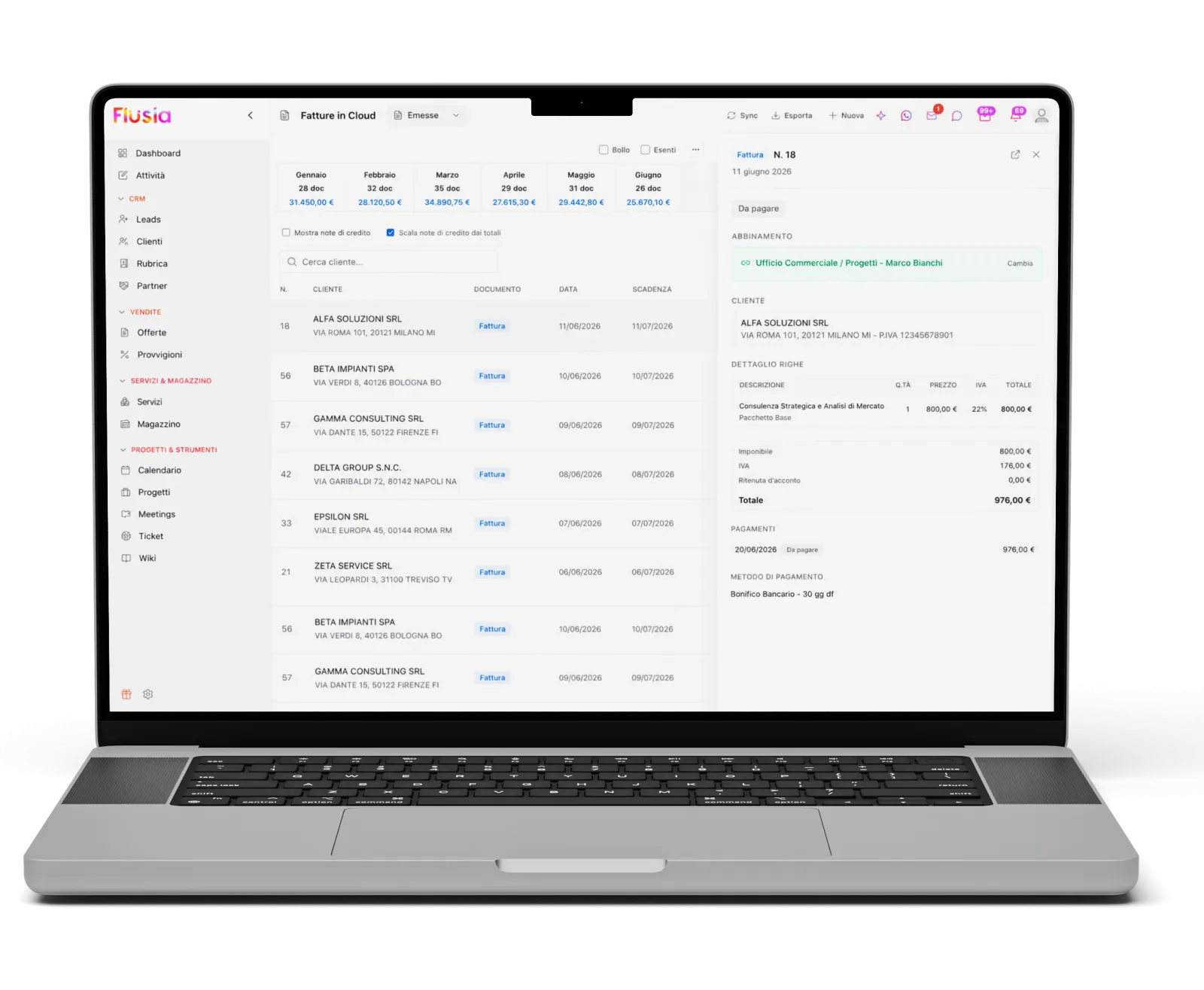
List of invoices issued on Fatture in Cloud viewed from Flusia, with one invoice's detail and payment status

Three everyday situations

What changes in practice when CRM and invoicing talk to each other.

From signed quote to invoice, nothing retyped

The client signs the quote online, Flusia queues the invoice with services, quantities, VAT and instalments already set. You review it and issue it on Fatture in Cloud, which numbers it and sends it to the SDI. If you prefer, the queue can be processed in bulk at month end.

Who has paid and who has not, inside the CRM

Every hour Flusia reads invoice status from Fatture in Cloud and matches receipts to open invoices. Sales reps see on the client record what has been paid and commissions are computed on cash received, not on invoiced amounts.

Bank movements sorted by category

The Fatture in Cloud cashbook flows into the CRM: the rules you set (for instance “anything containing Aruba goes to Software”) classify movements on their own, AI takes care of the rest and the financial dashboard shows trend, categories and cash flow. You can also ask questions about your numbers in plain language.

What gets synced

DataHow
CustomersOne-click import and export, in both directions. Before generating a contract you can look the client up on Fatture in Cloud and fill in the missing fields.
Invoices and e-invoicesCreated from the CRM on Fatture in Cloud: B2B, B2C and public administration, with VAT rates, stamp duty and payment terms. Numbering and SDI submission stay with Fatture in Cloud.
PaymentsPayment status read hourly and also updated via webhook; automatic matching between payments and invoices.
CashbookBank movements synced, expense categories with rules and AI classification, financial dashboard.

Editing already issued invoices happens in Fatture in Cloud: from the CRM you view them and link them to the client.

Fatture in Cloud invoice list inside Flusia, with monthly totals and payment status per invoice
Invoices and payments read from Fatture in Cloud, as seen from the CRM.

Frequently asked questions

The Matrix plan, together with costs and margins. You also need a Fatture in Cloud subscription: Flusia does not replace your invoicing software, it connects it to the CRM.